Computer Graphics

OpenGL

Martin Heistermann
Computer Graphics Group

OpenGL Tutorial

  • How to produce images with modern OpenGL
  • Goal: demystify framework code
  • More work than legacy OpenGL.
    (For performance reasons)
  • Drawing anything now requires:
    • Creating buffer objects to hold geometry/attributes
    • Vertex and fragment shaders
  • OpenGL Documentation browser: http://docs.gl
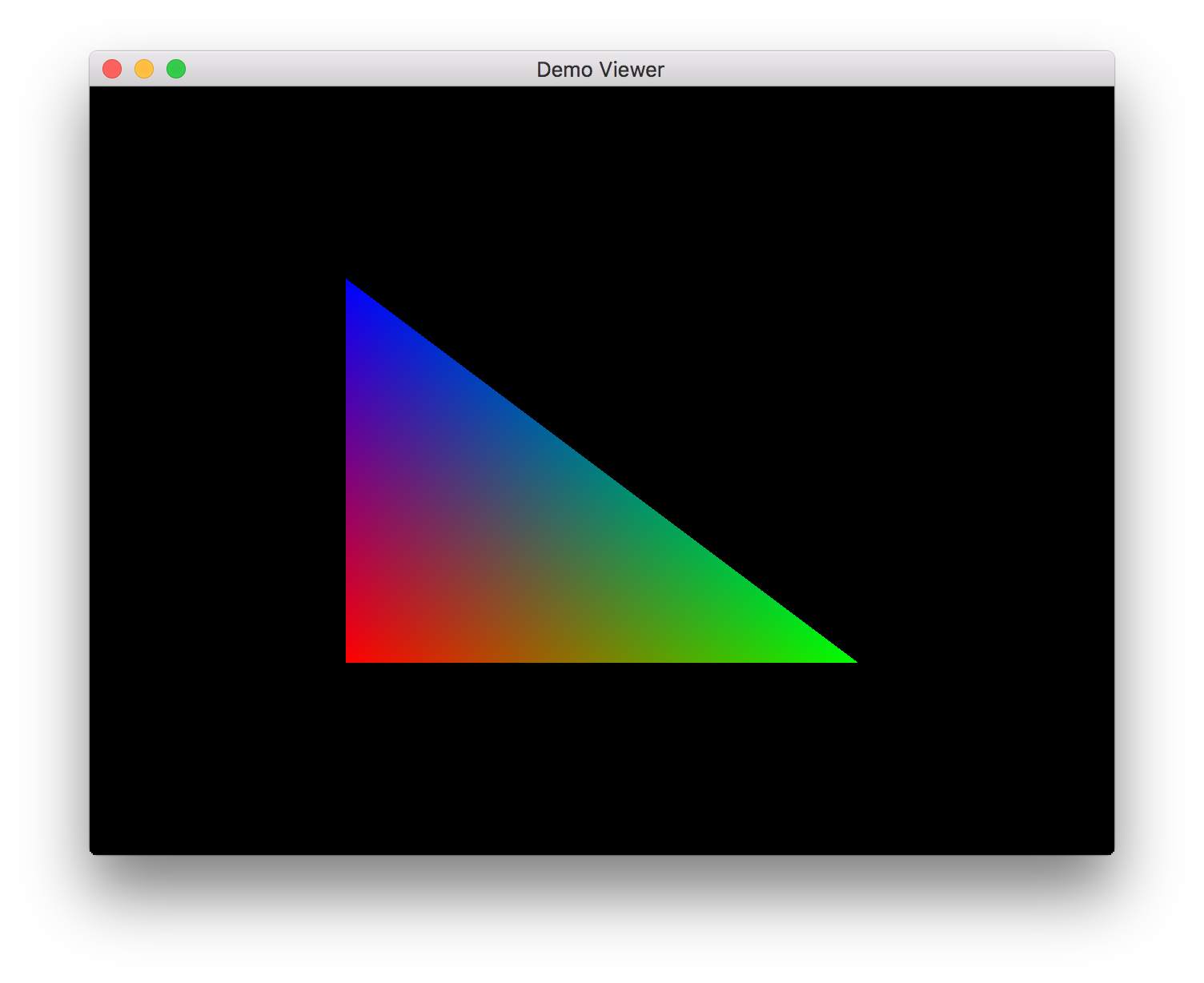
images/practical_05/opengl_demo.png

Creating a Window: GLFW

  • We use GLFW (“Graphics Library Framework”)
    to handle platform-specific details of:

    • Creating a window
    • Setting up an OpenGL rendering context
    • Responding to keyboard input
  • Starts simply enough:

      #include "demo_viewer.h"
      int main(int argc, char *argv[]) {
          Demo_viewer window("Demo Viewer", 640, 480);
          return window.run();
      }

    main.cpp

      class Demo_viewer
              : public GLFW_window
      {
      public:
          // ...

    demo_viewer.h

  • Make your OpenGL window class derive from GLFW_window

GLFW_window

  • Our GLFW_window class’s constructor takes care of telling GLFW how to set up the window:
GLFW_window::GLFW_window(const char* title, int width, int height) {
    glfwInit();

    // Request core profile and OpenGL version 3.2
    glfwWindowHint(GLFW_OPENGL_PROFILE, GLFW_OPENGL_CORE_PROFILE);
    glfwWindowHint(GLFW_OPENGL_FORWARD_COMPAT, GL_TRUE);
    glfwWindowHint(GLFW_CONTEXT_VERSION_MAJOR, 3);
    glfwWindowHint(GLFW_CONTEXT_VERSION_MINOR, 2);

    // Create the window and select it as the target for rendering commands
    window = glfwCreateWindow(width, height, title, NULL, NULL);
    glfwMakeContextCurrent(window);

    // Set a few more options/keyboard callbacks.
    // ...
glfw_window.cpp

Main Loop

  • After window is constructed, we run the window’s event loop:
#include "demo_viewer.h"
int main(int argc,
        char *argv[])
{
    Demo_viewer window(
        "Demo Viewer",
        640, 480);
    return window.run();
}
main.cpp
int GLFW_window::run() {
    initialize(); // window-specific initialization
    int width, height;
    glfwGetFramebufferSize(window_, &width, &height);
    resize(width, height); // initialize viewport

    // Event loop
    while (!glfwWindowShouldClose(window_)) {
        timer(); // fire off timer (for animations)
        paint(); // draw scene
        glfwSwapBuffers(window_); // swap buffers
        glfwPollEvents(); // handle events
    }

    glfwDestroyWindow(window_);
    return EXIT_SUCCESS;
}
glfw_window.cpp

Window-specific initialization

  • Upload geometry/color data to OpenGL

    • If geometry doesn’t change, we shouldn’t copy it to the GPU every frame
    • Do the copy once before any rendering
    • Geometry can still be transformed by the vertex shader
  • Buffers holding this data are grouped in a Vertex Array Object

      int GLFW_window::run() {
          initialize();
          // ...

    glfw_window.cpp

      void Demo_viewer::initialize() {
          // Generate vertex array object
          //     Stores pointers to buffers holding vertex data
          //     (position, color, and other attributes)
          glGenVertexArrays(1, &vao);
          glBindVertexArray(vao);
          // Generate buffers to hold position/color/index data
          glGenBuffers(3, bufferObjects);
          // ...

    demo_viewer.cpp

Uploading Vertex Positions

void Demo_viewer::initialize() {
    // ...

    std::array<GLfloat, 3 * 3> positions = {-0.5f, -0.5f, 0.0f,
                                             0.5f, -0.5f, 0.0f,
                                            -0.5f,  0.5f, 0.0f };
    // Attribute 0 -> Vertex positions
    glBindBuffer(GL_ARRAY_BUFFER,
                 bufferObjects[MY_VTX_BUFFER]); // Work with vertex bufffer
    glBufferData(GL_ARRAY_BUFFER,          // Allocate buffer that is...
                 3 * 3 * sizeof(float),    //     large enough to fit 9 coordinates
                 positions.data(),         //     initialized with our position data
                 GL_STATIC_DRAW);          //     unlikely to change (performance hint)
    glVertexAttribPointer(0,               // Point vertex attribute 0 at our buffer
                          3, GL_FLOAT,     //     3 Floats per vertex
                          GL_FALSE,        //     Don't normalize
                          0, 0);           //     No gap between vertex data,
                                           //     No offset from array beginning.
    glEnableVertexAttribArray(0);

    // ...
demo_viewer.cpp

Uploading Vertex Colors, Indices

void Demo_viewer::initialize() {
    // ...
                                        //  R     G     B     A
    std::array<GLfloat, 3 * 4> colors = { 1.0f, 0.0f, 0.0f, 1.0f,
                                          0.0f, 1.0f, 0.0f, 1.0f,
                                          0.0f, 0.0f, 1.0f, 1.0f };
    // Attribute 1 -> Vertex colors
    glBindBuffer(GL_ARRAY_BUFFER, bufferObjects[MY_COLOR_BUFFER]);
    glBufferData(GL_ARRAY_BUFFER, 3 * 4 * sizeof(float), colors.data(), GL_STATIC_DRAW);
    glVertexAttribPointer(1, 4, GL_FLOAT, GL_FALSE, 0, 0);
    glEnableVertexAttribArray(1);

    // Upload indices of the vertices to draw
    std::array<GLuint, 3> indices = { 0, 1, 2 };
    glBindBuffer(GL_ELEMENT_ARRAY_BUFFER, bufferObjects[MY_INDEX_BUFFER]);
    glBufferData(GL_ELEMENT_ARRAY_BUFFER, 3 * sizeof(GLuint),
                 indices.data(), GL_STATIC_DRAW);
    // ...
demo_viewer.cpp
  • Index buffer defines stream of vertex data for drawing
    (Allows repeating vertices)

Compiling, Uploading Shaders

void Demo_viewer::initialize() {
    // ...
    demo_shader.load(SHADER_PATH "/demo.vert", SHADER_PATH "/demo.frag");
}
  • Creates shader program demo_shader by
    • Reading vertex and fragment shaders from your hard drive
    • Compiling and linking them
    • See Shader::load in shader.cpp for the details.
  • Note: shader compilation done by driver at run-time
    • No need to re-build your code to edit the shaders.
    • Error reporting not as good as c++ compilers; driver-dependent.

Drawing: the paint method

  • Now that data and shaders are on the GPU,
    we’re ready to draw!

      int GLFW_window::run() {
          // ...
          // Event loop
          while (!glfwWindowShouldClose(window_))
          {
              timer();
              paint();
              glfwSwapBuffers(window_);
              glfwPollEvents();
          }
          //...
      }

    glfw_window.cpp

      void Demo_viewer::paint() {
          const GLfloat CLEAR_COLOR[4] =
              { 0, 0, 0, 1 }; // opaque black
          glClearBufferfv(GL_COLOR, 0,
                          CLEAR_COLOR);
    
          // Render vertex stream as tris
          demo_shader.use();
          glDrawElements(GL_TRIANGLES,
                  3, // draw 3 vertices
                  GL_UNSIGNED_INT, NULL);
    
          glCheckError();
      }

    demo_viewer.cpp

Vertex and Fragment Shading

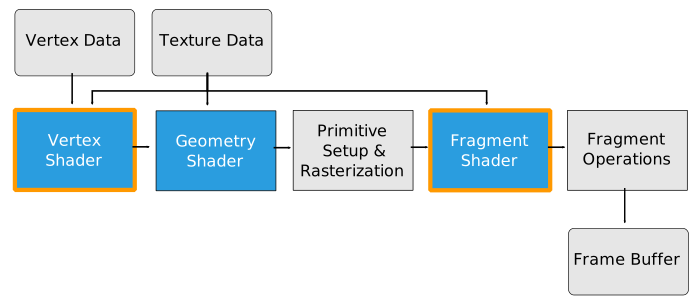
images/opengl32-vert_frag_high.svg
OpenGL 3.2 Pipeline
  • Vertex shader demo.vert computes per-vertex quantities that are interpolated and fed into fragment shader
    • Positions
    • Colors
  • Fragment shader demo.frag outputs color of rasterized pixels

Vertex and Fragment Shaders

#version 150
#extension GL_ARB_explicit_attrib_location : enable
layout (location = 0) in vec3 v_position; // bind v_position to attribute 0
layout (location = 1) in vec4 v_color;    // bind v_color    to attribute 1
out vec4 v4f_color; // Interpolated output to be read by fragment shader

void main() {
    // pass through color and position from the vertex attributes
    v4f_color = v_color;
    gl_Position = vec4(v_position, 1.0);
}
demo.vert
#version 150
in  vec4 v4f_color; // Interpolated input read from vertex shader
out vec4 f_color;   // Final color output produced by fragment shader.
                    // (Can name this anything you want...)
void main() {
    // pass through interpolated fragment color
    f_color = v4f_color;
}
demo.frag

Displaying the Completed Frame

int GLFW_window::run() {
    // ...
    // Event loop
    while (!glfwWindowShouldClose(window_)) {
        timer(); // fire off timer (for animations)
        paint();                  // draw scene
        glfwSwapBuffers(window_); // swap buffers
        glfwPollEvents(); // handle events
    }
    //...
}
glfw_window.cpp
  • GLFW double-buffers by default: show only fully drawn frames
    • Drawing happens in off-screen buffer
    • Entire rendered frame moved on-screen by glfwSwapBuffers
    • Synchronized to screen refresh to prevent tearing
      (see glfwSwapInterval(1) in glfw_window.cpp).

Vertex and Fragment Shaders: Result

images/practical_05/opengl_demo.png

GLSL

  • Fragment and vertex shaders written in GLSL

  • Built-in Types

    • Standard: float, int, bool, arrays, structs
    • Vectors: vec2, vec3, vec4
    • Matrices: mat2, mat3, mat4
      • Multiplication operator is overloaded!
    • Textures: sampler1D, sampler2D, sampler3D
  • Swizzle operator: flexible way to access vector components

    vec4 pos = vec4(1.0, 2.0, 3.0, 4.0);
    pos.xw = vec2(5.0, 6.0);  // pos = (5.0, 2.0, 3.0, 6.0)
    pos.wx = vec2(7.0, 8.0);  // pos = (8.0, 2.0, 3.0, 7.0)
    pos.xx = vec2(3.0, 4.0);  // illegal - 'x' used twice
  • Concatenation constructors: vec4(vec3(a,b,c), d)

GLSL: Control Structures

  • Selection

    • if-else, switch-case-default
  • Iterations

    • for, while, do-while
  • Functions

    • float myFunc(in x, out result)
      in: passed by value (copied from caller)
      out: copied back to caller
      inout: “call by reference”

GLSL: Built-in Functions

  • Trigonometric functions
    • radians, degrees, sin, cos, tan, asin, acos, atan
  • Exponentials
    • pow, exp, log, exp2, log2, sqrt, inversesqrt
  • Common
    • abs, floor, fract, mod, clamp, mix, step, smoothstep, …
  • Geometry
    • length, distance, dot, cross, normalize, reflect, refract
  • Textures
    • texture{1D,2D,3D,Cube}, shadow{1D, 2D}

GLSL: Type Qualifiers

  • uniform
    • constant input variable for shader
    • “Global variable”; doesn’t vary per primitive
    • specified by glUniform*()
  • in
    • input of vertex/fragment shader
    • varies per primitive (e.g. vertex position, pixel color)
    • vertex inputs specified by glVertexAttrib*()
  • out
    • output of vertex shader = input of fragment shader
    • output of fragment shader = pixel color

Uniform Example

  • Now let’s add some animation;
    we update our vertex shader to accept a uniform:
#version 150
#extension GL_ARB_explicit_attrib_location : enable

layout (location = 0) in vec3 v_position; // bind v_position to attribute 0
layout (location = 1) in vec4 v_color;    // bind v_color    to attribute 1
uniform float time;

out vec4 v4f_color; // Interpolated output to be read by fragment shader

void main() {
    v4f_color = mix(v_color, vec4(1, 1, 1, 1), 0.5 * (1.0 + sin(time)));
    gl_Position = vec4(v_position, 1.0);
}
demo.vert

Uniform Example

  • Now let’s add some animation;
    we update our vertex shader to accept a uniform
  • … then set this uniform’s value from our CPP code:
void Demo_viewer::paint() {
    const GLfloat CLEAR_COLOR[4] = { 0, 0, 0, 1 }; // opaque black
    glClearBufferfv(GL_COLOR, 0, CLEAR_COLOR);

    // Render vertex stream as triangles
    demo_shader.use();

    float timeSecs = glfwGetTime();
    demo_shader_.set_uniform("time", timeSecs);
    glDrawElements(GL_TRIANGLES,
                   3, // draw 3 vertices
                   GL_UNSIGNED_INT, NULL);
    glCheckError();
}
main.cpp

Uniform Example

  • The result:


Responding to Events

  • GLFW sends key press events to our code using the keyboard callback:
    virtual void keyboard(int key, int scancode, int action, int mods) {
        if (action == GLFW_PRESS || action == GLFW_REPEAT)
            std::cout << "Key " << key << " pressed." << std::endl;
    }
glfw_window.cpp
  • You can also respond to mouse events in a similar way
    (but our assignments won’t need this)

OpenGL debugging tips

Questions?