Computer Graphics

Rasterization

Prof. Dr. David Bommes
Computer Graphics Group

Last Time: Triangle Meshes

Triangle Meshes

  • Triangle meshes can represent arbitrary surfaces
images/vw.png

What is a triangle mesh?

  • Connectivity / Topology
    • Vertices \(\mathcal{V} = \{ v_1, \dots, v_n \}\)
    • Edges \(\mathcal{E} = \{ e_1, \dots, e_k \}\), \(e_i \in \mathcal{V} \times \mathcal{V}\)
    • Faces \(\mathcal{F} = \{ f_1, \dots, f_m \}\), \(f_i \in \mathcal{V} \times \mathcal{V} \times \mathcal{V}\)
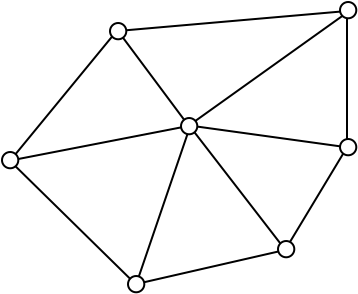
images/triangle-mesh-0.png

  • Geometry
    • Vertex positions \(\{ \vec{p}_1, \dots, \vec{p}_n \}\), \(\vec{p}_i \in \R^3\)
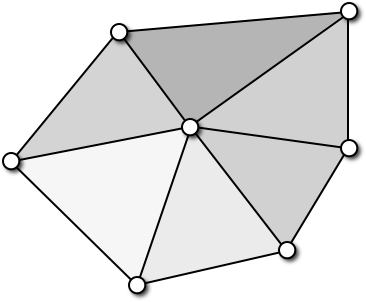
images/triangle-mesh-1.png

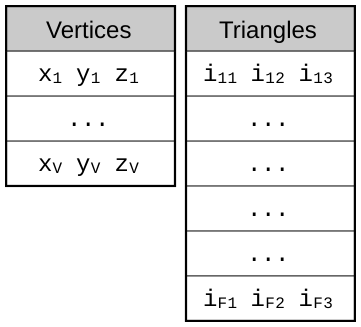
Indexed Face Set

  • Indexed Face Sets are used for many file formats (e.g. OFF, OBJ, VRML)
  • Memory consumption
    12 B/v + 12 B/f = 36 B/v
images/data-structure-2.svg

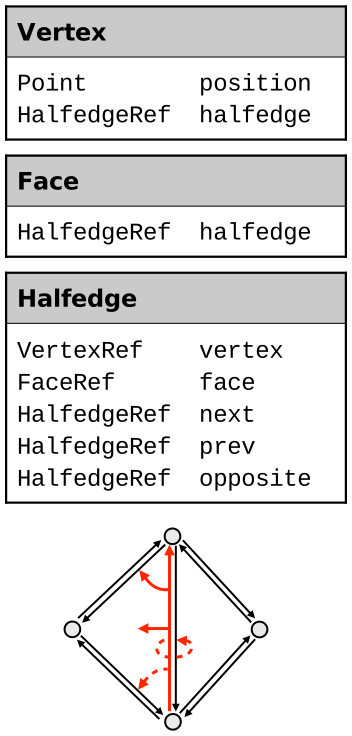
Halfedge-Based Connectivity

  • Store connectivity per halfedge
  • Memory consumption
    16 B/v + 4 B/f + 20 B/h = 144 B/v
    (can be reduced to 96 B/v)
  • Edges & halfedges explicitly represented
  • No case distinctions during traversal!
images/data-structure-5.svg

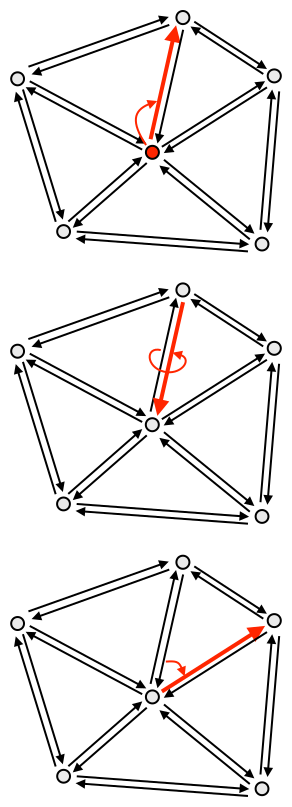
One-Ring Traversal

  • Simple one-ring traversal without case distinctions:
  1. Start at vertex
  2. Outgoing halfedge
  3. Opposite halfedge
  4. Next halfedge
  5. Opposite halfedge
  6. Next halfedge
images/data-structure-6.svg

Flat Shading vs. Phong Shading

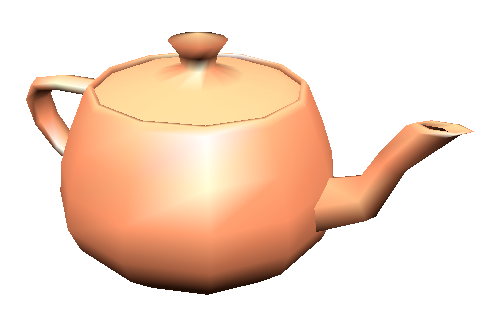
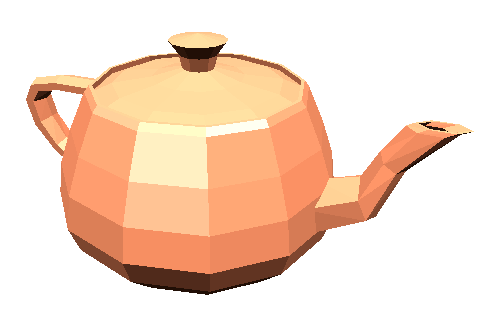
  • Flat shading
    • Use constant face normal for lighting
    • Yields facetted appearence
    • Mach band effect emphasizes this even more
images/teapot-flat.png

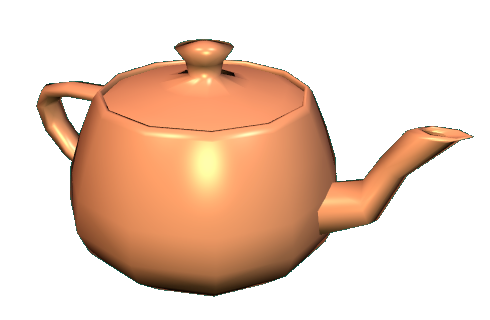
  • Phong shading
    • Use smooth normal field for lighting
    • Compute normal vectors per vertex
    • Barycentric interpolation of normal vectors
images/teapot-phong.png

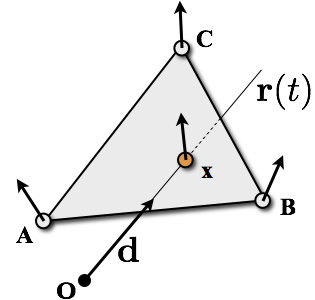
Interpolate Vertex Normals

  • Intersection point with barycentric coordinates \[ \vec{x} = \alpha\vec{A} + \beta\vec{B} + \gamma\vec{C}\]
  • Linearly interpolate vertex normals \[ \vec{n}\of{\vec{x}} = \alpha\vec{n}\of{\vec{A}} + \beta\vec{n}\of{\vec{B}} + \gamma\vec{n}\of{\vec{C}} \]
  • Use \(\vec{n}(\vec{x})\) to light point \(\vec{x}\)
  • Normalize for lighting calculations!
images/ray-triangle-shading.png

Spatial Data Structures

  • Brute-Force
    • Intersect ray with all \(n\) triangles of the mesh
    • Select intersection with smallest positive ray parameter \(t\)
    • Computational cost: \(\mathcal{O}(n)\)
  • Bounding Volumes
    • Bound mesh by simple-to-interesect objects (sphere, box, etc.)
    • Only if ray intersects bounding volume, then test individual triangles
    • Bounding volume hierarchy leads to \(\mathcal{O}(\log n)\)
  • Spatial Hierarchy
    • Partition scene into a spatial hierarchy
    • Grid, Octree, kD-tree, BSP-tree
    • Spatial hierarchy leads to \(\mathcal{O}(\log n)\)

Bounding Volume Hierarchies

  • Construction: bottom-up

Bounding Volume Hierarchies

  • Traversal: recursive top-down

each geometric primitive intersected only once (no mailboxing required)

KD-Trees

  • Construction
    • compute bounding box
    • recursively split cell using axis-aligned plane until maximum depth or minimum number of remaining objects is reached
    • choosing the split plane
      • midpoint
      • median cut
      • advanced strategies
    • builds a binary tree structure
root internal nodes leaf nodes

Today: Rasterization & 2D Transformations

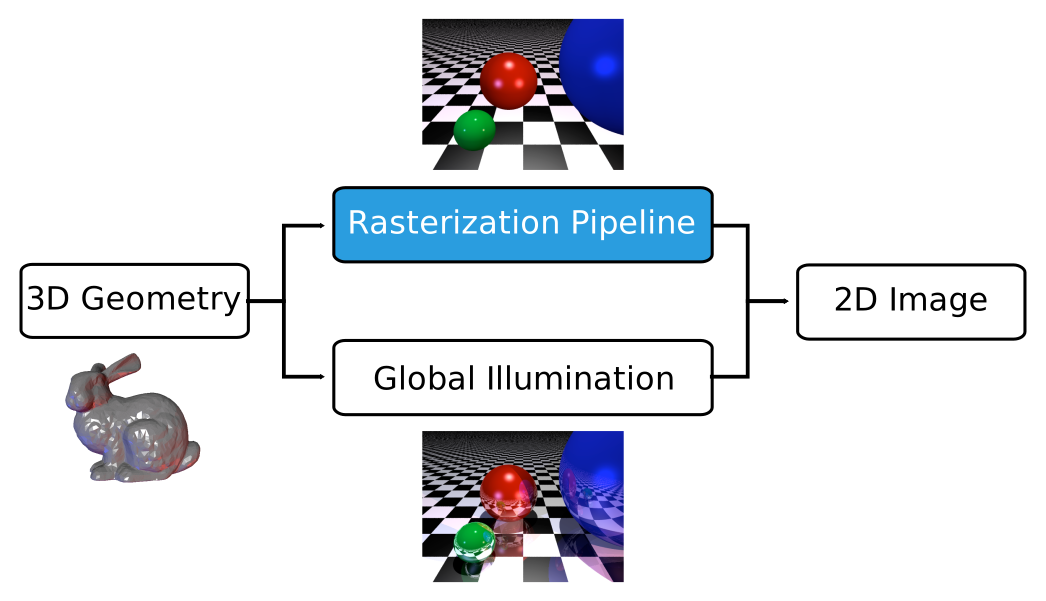
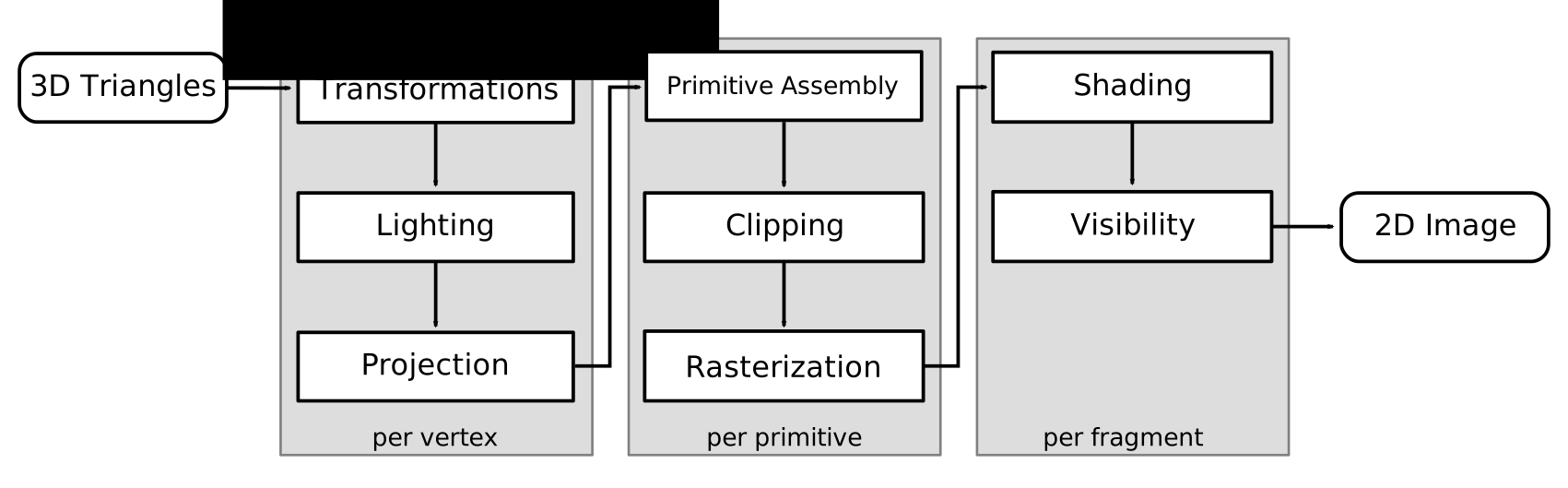
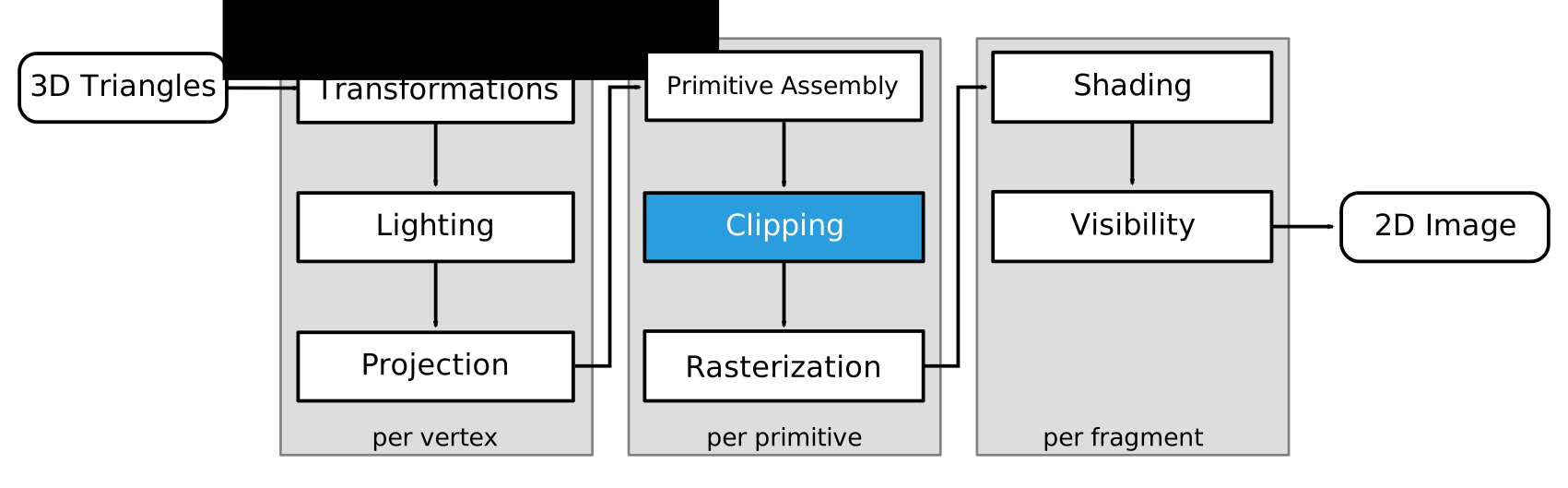
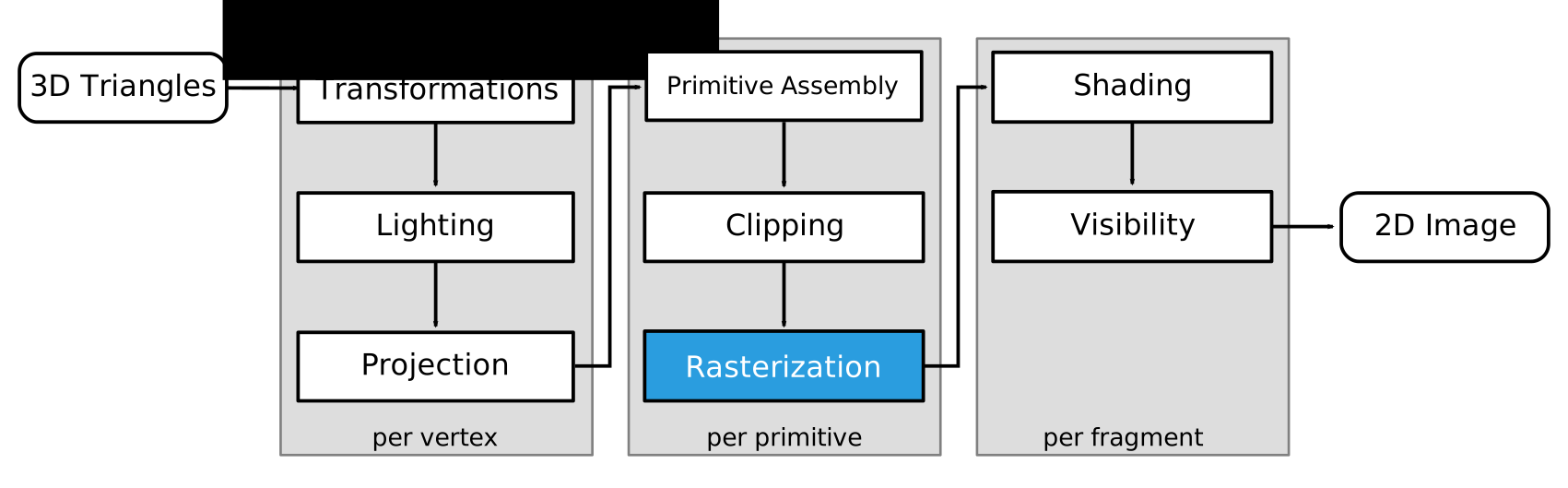
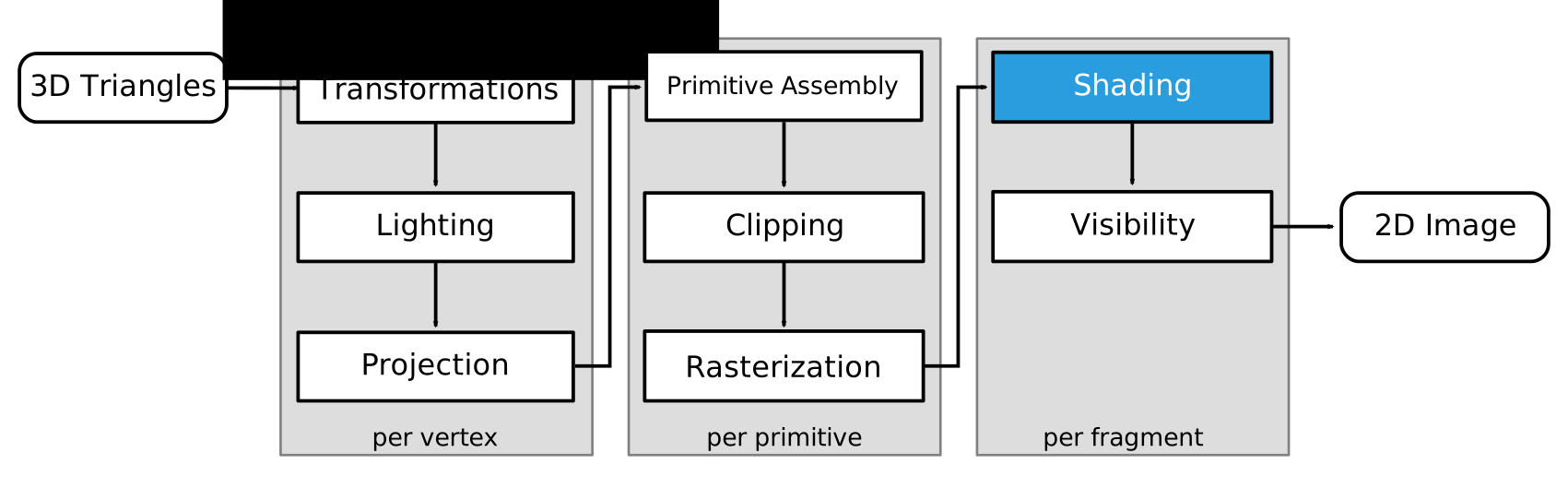
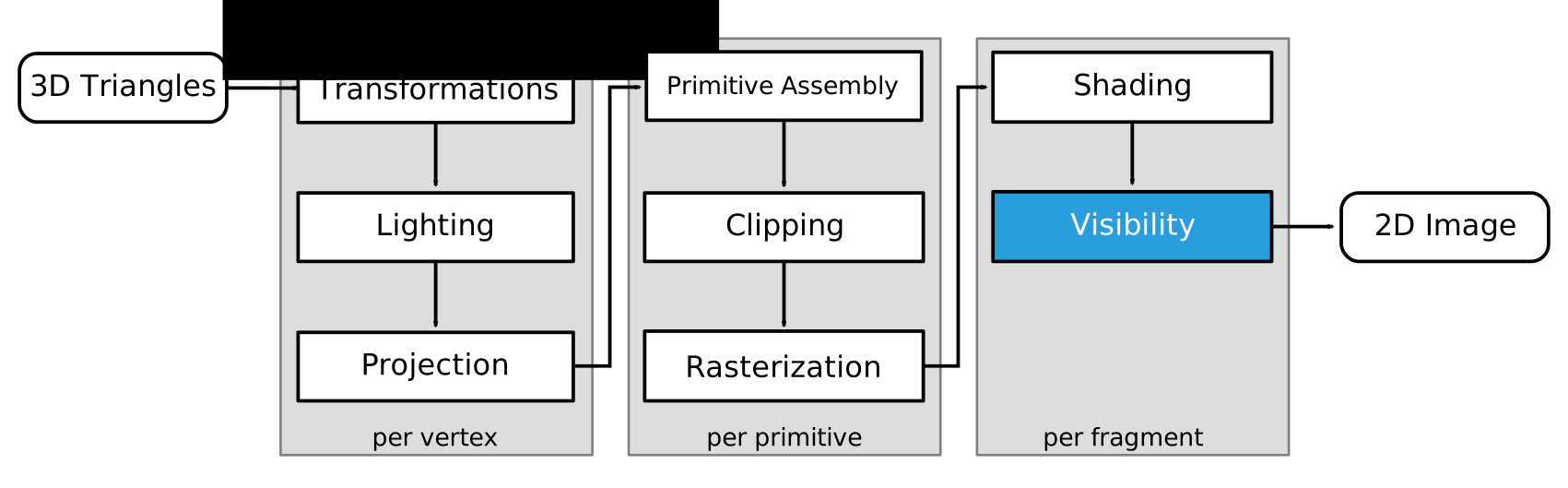
Rasterization Pipeline

images/graphics-rasterization.svg

Ray Tracing vs. Rasterization

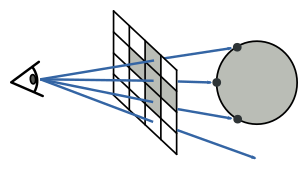
  • Ray Tracing
    • Shoot rays from 2D pixels into 3D scene
    • “backward rendering”
    • needs ray intersections
images/raytracing-vs-rasterization-1.svg
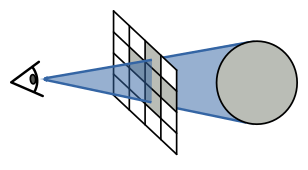
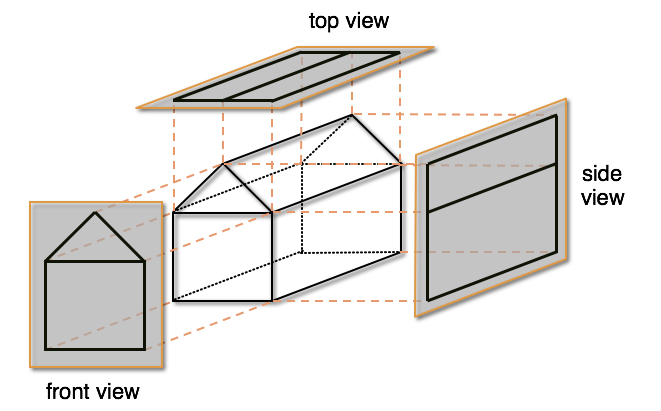
  • Rasterization
    • Project 3D objects onto 2D image plane
    • “forward rendering”
    • needs transformations, projections, visibility computation
images/raytracing-vs-rasterization-2.svg

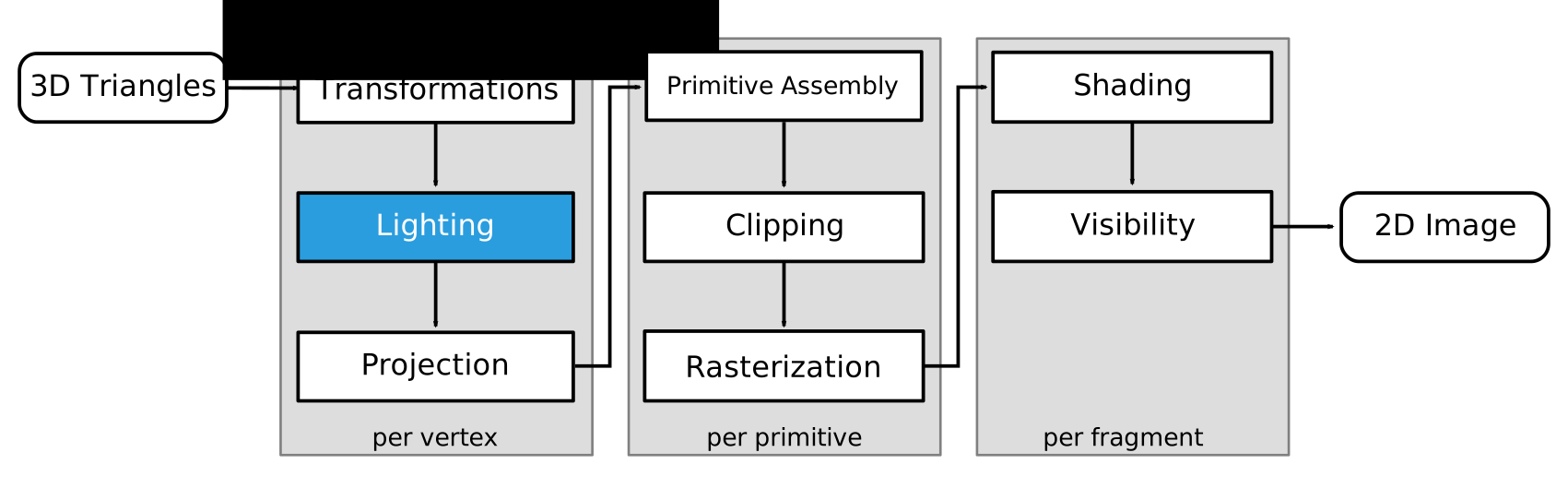
Rasterization Pipeline

images/rendering-pipeline.svg

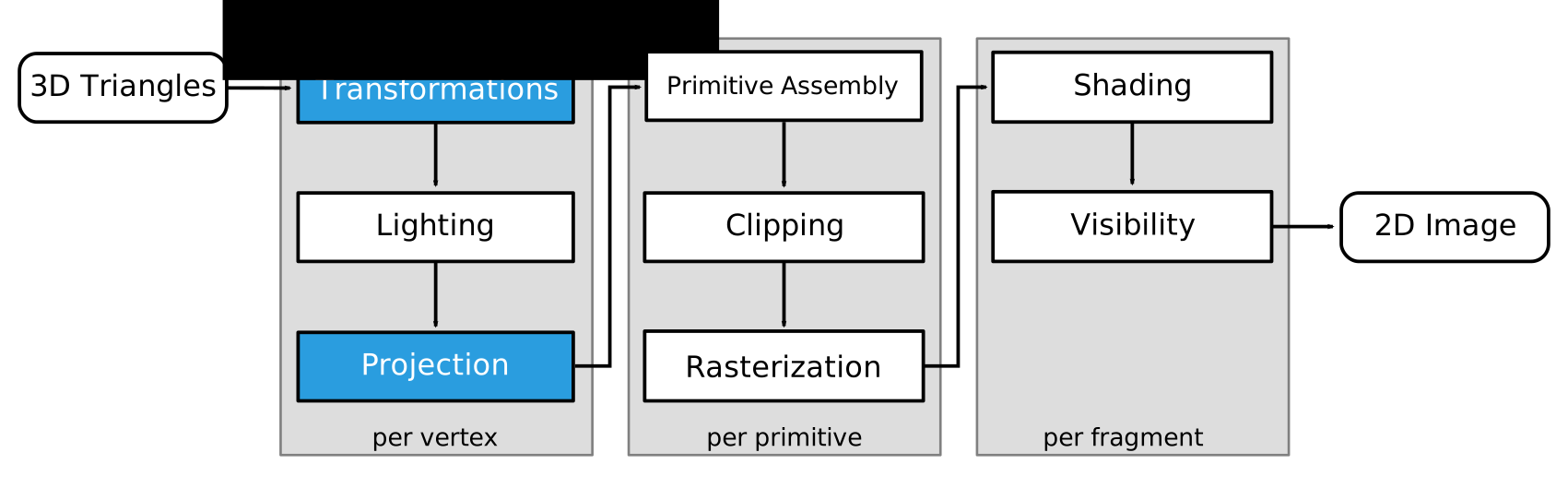
Transformations & Projections

images/rendering-pipeline-1.svg

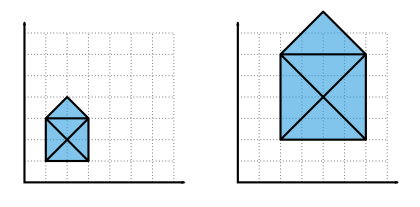
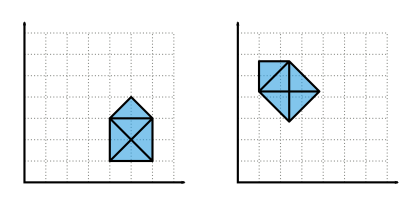
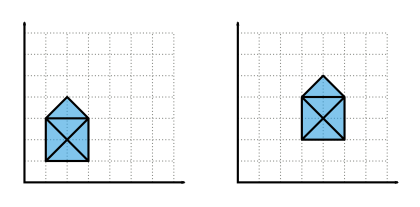
images/trafo-scaling.svgscaling images/trafo-rotation.svgrotation images/trafo-translation.svgtranslation

Transformations & Projections
images/rendering-pipeline-1.svg

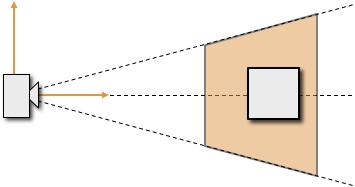
images/ortho-projection.png images/frustum-1.png

Lighting

images/rendering-pipeline-2.svg

images/teapot-flat.pngflat images/teapot-gouraud.pngGouraud images/teapot-phong.pngPhong

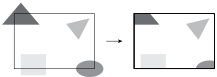
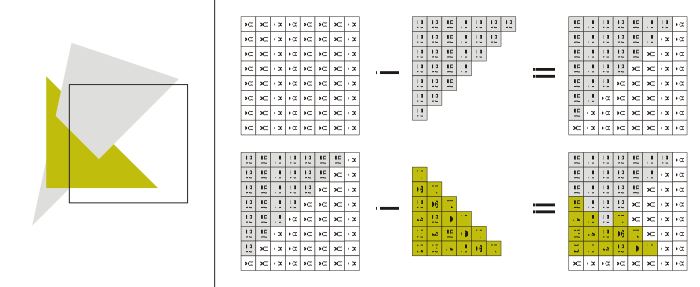
Clipping

images/rendering-pipeline-3.svg

images/clipping.svg

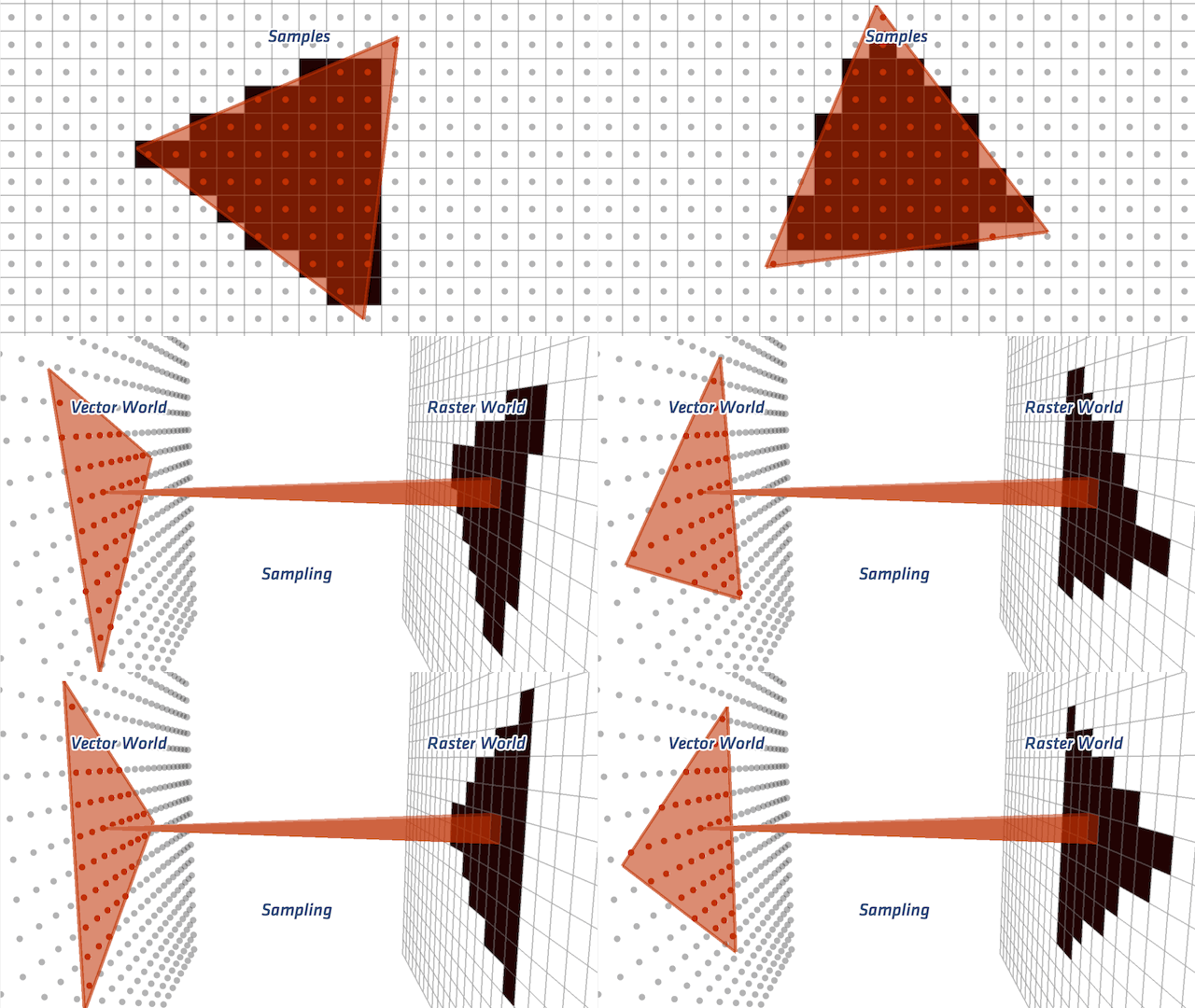
Rasterization

images/rendering-pipeline-4.svg

images/rasterization.gif

Shading

images/rendering-pipeline-5.svg

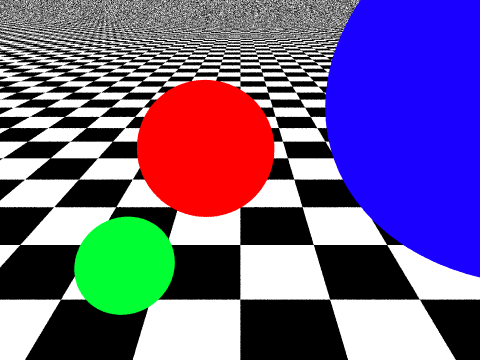
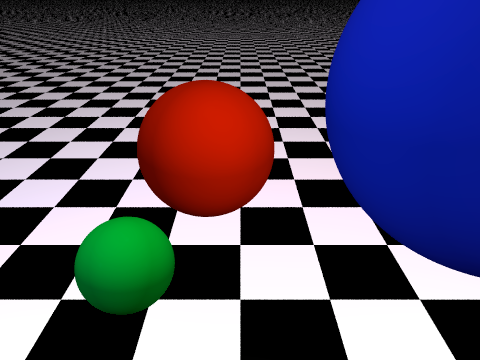
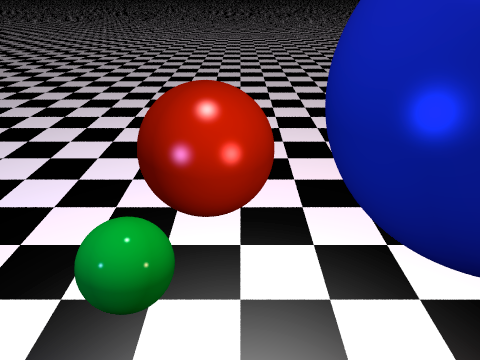
Phong Lighting Model

images/spheres-0.pngambient images/spheres-1.png+diffuse images/spheres-2.png+specular

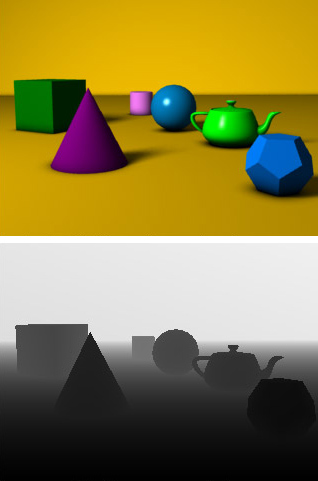
Visibility

images/rendering-pipeline-6.svg

images/z-buffer.jpg images/z-buffer.svg z-Buffer

Rasterization Pipeline

images/rendering-pipeline.svg

Computer Graphic APIs

  • Low-level rendering (\(\rightarrow\) rendering commands)
    • OpenGL (Open Graphics Library)
    • Direct3D
    • Vulkan, Metal, Direct3D 12
    • WebGL, WebGPU
  • High level scene graphs (\(\rightarrow\) scene description)
    • OpenInventor
    • OpenSG, InstantReality
    • OpenSceneGraph
    • Java3D

What is OpenGL?

  • Computer Graphics Rendering API
    • render images from geometry and image data
    • process simple primitives (points, lines, triangles)
    • create interactive 3D graphics applications!
    • see http://www.opengl.org
  • OpenGL is
    • operating system independent (Linux, Mac, Win, mobile)
    • window system independent (X-Windows, Wayland, …)
    • hardware accelerated (Nvidia, ATI/AMD, Intel, …)

OpenGL History

OpenGL 1.0 (1994)

images/opengl10.svg

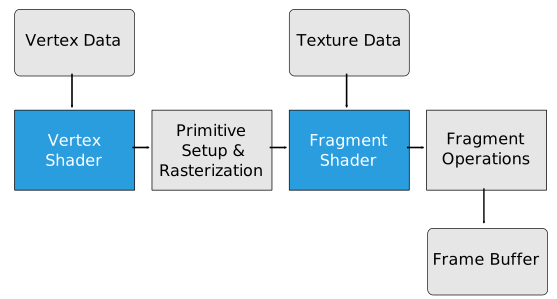
  • Fixed function pipeline, only parameters could be set

OpenGL 2.0 (2004)
images/opengl20.svg

  • Programmable vertex and fragment shaders
  • GL Shading Language (GLSL) 1.10

OpenGL 3.0 (2008)
images/opengl30.svg

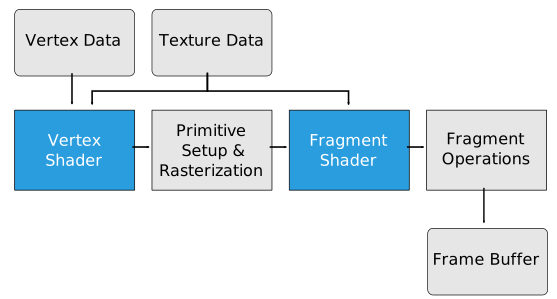
  • GLSL 1.30
  • Unified shaders
  • Introduced the deprecation model
    • marked “useless” features deprecated
    • For 15 years features have been added
    • No feature has ever been removed
    • But hardware changed significantly!

OpenGL 3.1 (2009)

images/opengl30.svg

  • GLSL 1.40
  • Removed deprecated features, but they could still be accessed through the extension GL_ARB_compatibility

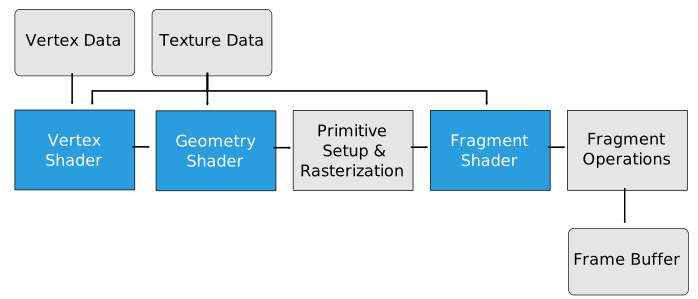
OpenGL 3.2 (2009)
images/opengl32.svg

  • GLSL 1.50
  • Added geometry shaders
  • Introduced context profiles
    • CoreProfile: only non-deprecated features (We focus on core profile!)
    • CompatibilityProfile: all features ever in OpenGL

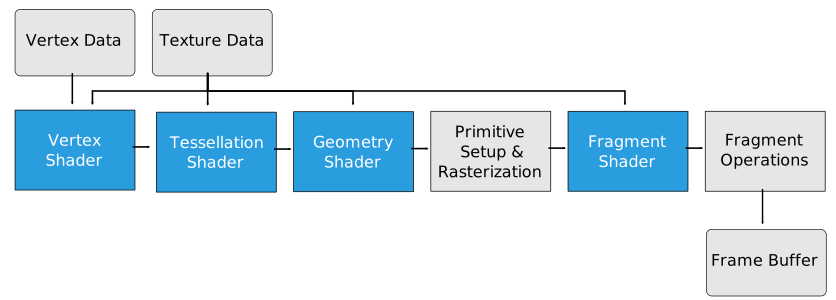
OpenGL 4.1 (2010)
images/opengl41.svg

  • GLSL 4.10
  • Added tessellation shaders

Window API

Window APIs

  • GLX, CGL, AGL
    • Glue between OpenGL and windowing system
  • GLUT, GLFW, Qt, …
    • Portable windowing (GUI) APIs
    • Handle windows, key/mouse events, …
    • Provide OpenGL widgets

Which Window API?

  • GLUT
    • Too old, does not provide core profile
  • freeglut
    • Ok for Linux/Windows, not really ok for Mac
  • GLFW
  • Qt
    • Nice (but complex!) GUI API for Linux, Windows, Mac
    • http://www.qt.io
    • useful for larger projects

Why not old OpenGL?

GPU, OS old OpenGL
immediate mode
new OpenGL
vertex buffer objects
NVIDIA GeForce 9400M, Mac OS X 12 56
NVIDIA GeForce GT 120, Mac OS X 27 216
NVIDIA GeForce GTX 285, Windows 7 10 315
ATI Radeon HD 5680, Mac OS X 20 592
NVIDIA GeForce GTX 580, Linux 7 600

Rendering performance in million triangles per second,
measured on a model with 400k triangles

Modern OpenGL

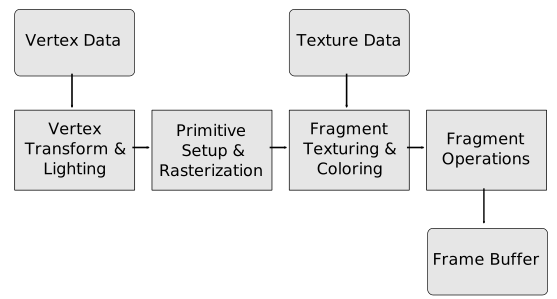
OpenGL 3.2 Pipeline

  • We will focus on OpenGL 3.2 (and higher) from now on.
images/opengl32.svg

OpenGL 3.2 Pipeline

images/opengl32-vert_high.svg

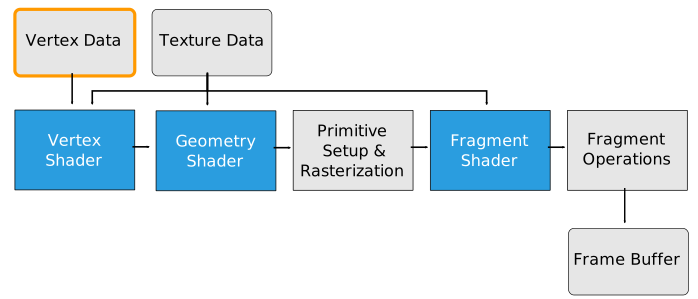
  • How to store & send geometry data?

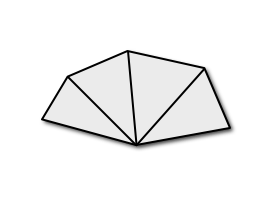
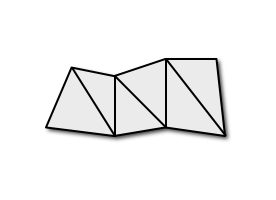
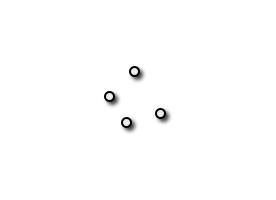
Primitives in Core Profile
images/gl_points.png
GL_POINTS
images/gl_lines.png
GL_LINES
images/gl_line_strip.png
GL_LINE_STRIP
images/gl_line_loop.png
GL_LINE_LOOP
images/gl_triangles.png
GL_TRIANGLES
images/gl_triangle_fan.png
GL_TRIANGLE_FAN
images/gl_triangle_strip.png
GL_TRIANGLE_STRIP

Geometric Objects

  • Vertex data must be stored in vertex arrays (VAs)
    • No more (inefficient) immediate mode rendering!
  • VAs must be stored in vertex buffer objects (VBOs)
    • VBOs are vertex arrays that are stored on the GPU
  • VBOs must be stored in vertex array objects (VAOs)
    • VAOs manage all VBOs and VertexAttribPointers
    • Rendering: Simply enable VAO per geometric object

Store mesh data in VBO/VAO

// buffer indices
GLuint vao, vbo, nbo, ibo;

//mesh data
GLfloat  positions[3*n_vertices];
GLfloat    normals[3*n_vertices];
GLuint    indices[3*n_triangles];

Store mesh data in VBO/VAO

// generate vertex array object
glGenVertexArrays(1, &vao);
glBindVertexArray(vao);
// vertex positions -> attribute 0
glGenBuffers(1, &vbo);
glBindBuffer(GL_ARRAY_BUFFER, vbo);
glBufferData(GL_ARRAY_BUFFER, 3*n_vertices*sizeof(GLfloat), positions, GL_STATIC_DRAW);
glVertexAttribPointer(0, 3, GL_FLOAT, GL_FALSE, 0, 0);
glEnableVertexAttribArray(0);
// normal vectors -> attribute 1
glGenBuffers(1, &nbo);
glBindBuffer(GL_ARRAY_BUFFER, nbo);
glBufferData(GL_ARRAY_BUFFER, 3*n_vertices*sizeof(GLfloat), normals, GL_STATIC_DRAW);
glVertexAttribPointer(1, 3, GL_FLOAT, GL_FALSE, 0, 0);
glEnableVertexAttribArray(1);
// triangle indices
glGenBuffers(1, &ibo);
glBindBuffer(GL_ELEMENT_ARRAY_BUFFER, ibo);
glBufferData(GL_ELEMENT_ARRAY_BUFFER, 3*n_triangles*sizeof(GLuint), indices, GL_STATIC_DRAW);

Geometric Objects

  • Render using vertex arrays
    // activate VAO (this activates all VBOs and attrib pointers)
    glBindVertexArray(vao);
    // draw triangles
    glDrawElements(GL_TRIANGLES, 3*n_triangles, GL_UNSIGNED_INT, NULL);
  • Delete buffers and vertex array in the end
    // delete vertex buffer objects
    glDeleteBuffers(1, &vbo);
    glDeleteBuffers(1, &nbo);
    glDeleteBuffers(1, &ibo);
    // delete vertex array object
    glDeleteVertexArrays(1, &vao);

OpenGL 3.2 Pipeline

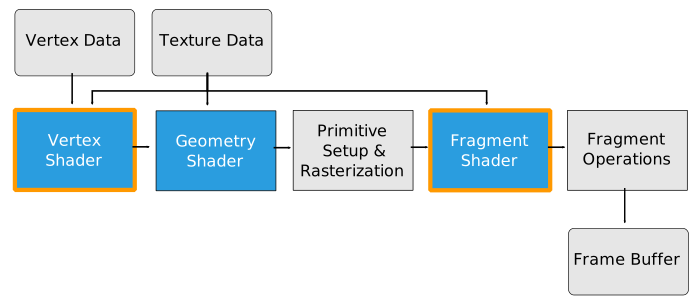
  • Vertex & Fragment Shaders
images/opengl32-vert_frag_high.svg

OpenGL Core Profile

  • In Core Profile, you have to use shaders!
    • vertex & fragment shaders are mandatory
    • geometry/tessellation shaders are optional
  • No predefined transformations/projections
    • do all matrix work yourself
  • No predefined lighting functions
    • do all lighting work yourself

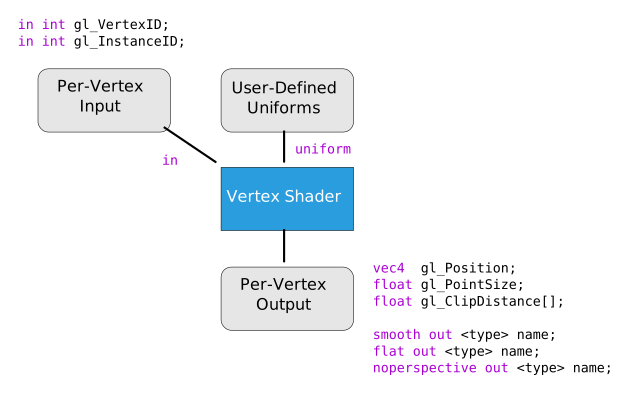
Vertex Shader

  • Input
    • vertex attributes (position, normal, color, …)
    • constant (uniform) parameters
  • Output
    • required: vertex’ clip space coordinates
      (after model, view, and projection transformation)
    • optional: vertex colors, texture coordinates, point size, …
    • outputs are interpolated and sent to fragment shader
  • One vertex in, one vertex out
    • No connectivity information

Vertex Shader

images/opengl-vertex_shader.svg

Vertex Shader

  • What we have to do ourselves
    • modelview and projection transform
    • normal transformation
    • per-vertex lighting (for Gouraud shading)
  • What we cannot do ourselves (but can configure)
    • clipping
    • perspective division
    • viewport transformation

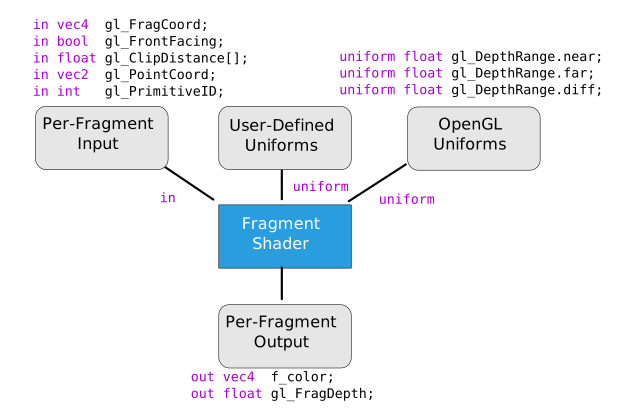
Fragment Shader

  • Input
    • fragment’s window position
    • primary / secondary colors
    • texture coordinates
    • for per-pixel lighting: data for Phong model
    • all input is interpolated from vertex shader output
  • Output
    • pixel’s color
    • Optional: pixel’s depth value

Fragment Shader

images/opengl-fragment_shader.svg

Fragment Shader

  • What we have to do ourselves
    • texture fetch
    • texture application
    • per-pixel lighting (for Phong shading)
  • What we cannot do ourselves (but can configure)

GLSL: OpenGL Shading Language

  • Part of OpenGL since version 2.0
  • High level shading language
  • Very similar to C/C++
  • Built-in vector and matrix types
  • Many powerful helper function
  • Poor debugging support 😢
  • … Stay tuned for exercise session

Literature

  • Shreiner, Seller, Kessenich, Licea-Kane: OpenGL Programming Guide, 8th edition, 2013.

images/shreiner.png
  • Rost: OpenGL Shading Language, 3rd edition, 2009.

images/rost.png
  • Seller, Wright, Haemel: OpenGL SuperBible, 7th edition, 2015

images/seller.png

References